
Create Music with Beatlab’s Simple Grid Sequencer
Overview
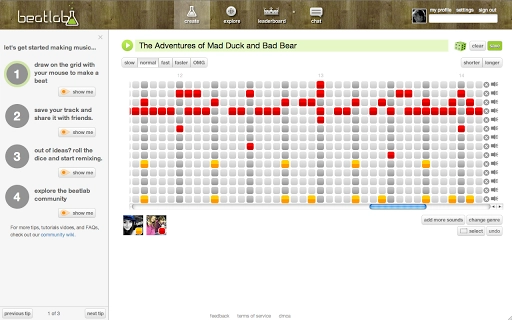
Beatlab offers a streamlined approach to music creation, designed for users with no formal training in music theory or instrument playing. The software enables individuals to compose tracks using a grid-based sequencer, where time is represented along the columns and sounds along the rows. This intuitive layout allows users to create rhythmic patterns by simply clicking on grid cells, making the process of producing music accessible to beginners and casual creators alike.
The platform supports both original composition and collaborative remixing, allowing users to build upon existing musical ideas shared by others. Tracks can be shared privately with friends or published publicly for broader audience engagement. Additionally, finished compositions can be exported as MP3 files for use on personal devices or as ringtones.
The software is accessible through web-based deployment, requiring users to disable Flash blockers to enable audio playback. While the developer did not provide additional details about the company or its background, the tool’s focus on simplicity and community-driven creativity suggests a strong emphasis on inclusivity and user empowerment in the music-making process.
Key Features & Capabilities
- Grid-Based Sound Sequencer – Users construct music by activating cells in a visual grid, where each column represents a time step and each row corresponds to a distinct sound or instrument. This visual method simplifies the composition process, eliminating the need for traditional notation or keyboard input.
- Collaborative Track Building – Multiple contributors can work on a single track, each assigned a unique color to distinguish their input on the grid. This feature supports real-time or asynchronous collaboration, enabling creative exchange across users.
- Remix and Share Functionality – Users can remix tracks created by others, fostering a dynamic ecosystem of musical exchange. Completed tracks can be shared privately or published publicly, encouraging community interaction and feedback.
- MP3 Export Option – Finished compositions can be downloaded as MP3 files, allowing users to use their music on personal devices, integrate it into other projects, or convert it into ringtones.
- Flash-Dependent Audio Playback – Audio mixing and playback rely on Flash technology, which requires users to disable any Flash blockers for full functionality. This dependency may affect compatibility with modern browser settings.
These capabilities make Beatlab particularly suitable for educational settings, creative workshops, or informal music circles where accessibility and ease of use are prioritized. The visual interface lowers the barrier to entry, enabling users to experiment with rhythm and sound without technical constraints. For example, a classroom could use Beatlab to teach basic music concepts through hands-on composition, while friends could co-create a track during a virtual session.
User Interface, Workflow & Performance
The user interface of Beatlab centers around a large, interactive grid, providing a clear and visually engaging workspace. Navigation is straightforward, relying primarily on mouse clicks to activate and deactivate sounds within the grid. The layout is designed to minimize clutter, with essential controls positioned around the grid for quick access.
Workflow efficiency is enhanced by the immediate auditory feedback when a cell is clicked, allowing users to hear the impact of their changes in real time. However, the software’s reliance on Flash for audio processing may introduce performance inconsistencies, especially on systems with outdated or restricted browser configurations. The developer did not specify resource usage details, so general performance behavior cannot be confirmed.
Stability may vary depending on browser settings and Flash support. Users should expect a responsive experience under optimal conditions, but performance may degrade if Flash is not properly enabled or if system resources are constrained. No information was provided about CPU or RAM usage, so users should monitor system behavior during extended sessions.
Compatibility & System Requirements
Beatlab is compatible with Windows, Mac, and Linux operating systems, making it accessible across major desktop platforms. The software has a file size of 200MB, which suggests it includes a self-contained runtime environment or embedded dependencies. The version number is listed as 1.0, indicating an initial release with foundational features.
The developer did not provide additional system requirements, such as minimum RAM, processor speed, or graphics specifications. Compatibility information was partially provided, with no mention of browser compatibility beyond the Flash dependency. Users are advised to ensure their system supports Flash for audio playback.
The lack of detailed hardware requirements means that users should test the software in their environment to confirm functionality. No information was given about updates or installation procedures, so the setup process remains unclear.
Pros and Cons
Pros
- Intuitive grid-based interface for effortless music creation
- Supports collaboration and remixing across users
- Easy MP3 export for personal use and sharing
- Accessible to non-musicians with no prior training
- Available on Windows, Mac, and Linux platforms
Cons
- Relies on Flash technology, which may not be supported on modern systems
- No detailed system requirements provided
- Performance and stability depend on browser and Flash configuration
- Limited information about update frequency or support channels
- Visual design and layout may feel outdated compared to modern tools
FAQ Section
Is Beatlab compatible with my operating system?
Beatlab is designed to run on Windows, Mac, and Linux systems. However, specific hardware or software requirements were not listed by the developer. Users should ensure their system supports Flash for full functionality.
Can I use Beatlab offline?
While the software is accessible via web deployment, the ability to use it offline depends on browser settings and whether cached content is available. No information was provided about offline mode capabilities.
Is Beatlab safe to use?
Beatlab operates through a web-based interface and requires Flash for audio playback. Users should ensure their system has up-to-date security measures in place. The developer recommends disabling Flash blockers only when using trusted environments.
How do I update Beatlab?
Information about update frequency or automatic update mechanisms was not provided. Users are advised to check the official site or contact support for the latest version.
What type of license does Beatlab use?
Beatlab is available for free. The software does not require a paid subscription or license key. No details were provided about redistribution or commercial use rights.
Final Thoughts
Beatlab stands out as a user-friendly tool for creating music through a visual, grid-based interface. Its emphasis on simplicity, collaboration, and accessibility makes it ideal for beginners, educators, and creative groups seeking a low-barrier entry into music production. While the reliance on Flash technology presents a notable limitation, especially in modern computing environments, the core concept remains compelling.
The ability to remix, share, and export tracks in MP3 format adds practical value for personal and community use. For users who value creativity over technical complexity, Beatlab offers a refreshing alternative to traditional digital audio workstations. Despite missing details on system requirements and update mechanisms, the software delivers on its promise of easy music creation.
Download Beatlab now and start composing your next track with just a few clicks.







